Method 1: Use Your Laptop or Personal Computer
This will only work if you have a USB cable. If you do have a USB cable but no power block, you can plug your phone into your laptop or personal computer. If you don’t have access to a computer, you can borrow one or head on down to the library, a college computer lab, the Apple Store or an electronics store.

Method 2: Use A Portable Battery
The availability of portable batteries means that you can charge your iPhone even without a charger. There are so many different kinds to suit every budget. Ensure that you choose the battery pack carefully since they come in different voltage. Once you have your portable battery, here’s how to use it.
Step 1: Attach a USB cable to the portable battery pack and attach the other end to your iPhone.
Step 2: Turn on the battery pack and see if your iPhone is charging normally.
You can even find battery packs that can be permanently attached to the back of your iPhone to ensure a steady supply of power to the device. These packs do need to be charged once their power runs out.

Method 3: Use Your Car Charger
If you have a car charger, you might use it to charge your device in emergencies. It may be slower than what you are used to with your regular charger, but it is invaluable for those times when you need to charge your device but don’t have a charger.
To use it, you simply need to connect one end of the USB cable to the device and the other to the car charger.

Method 4: Depend on Devices with USB Ports
Just as you would use your laptop or personal computer to charge the iPhone, you can use any device with a USB port to help you charge your iPhone if you don’t have a charger. In this way, having a USB cable can be a life-saver.
Also Read:Top 6 Best Alternative Sites to YTS Torrent Movie Website 2019
Also Read:How to Factory Reset Your iPad without Passcode or iTunesAll you have to do is to connect one end to the iPhone and the other end to the device with the USB port and the iPhone will start charging. Some common devices with USB cables include stereos, bedside clocks and TVs.

Method 5: Use A Wind Turbine
A small wind turbine also offers you a great way to charge your iPhone. These are available at local electronic and outdoor supply stores. Once you’ve purchased one, here’s how you use it to charge your device.
Step 1: Read the manufacturers instructions on how to connect the wind turbine to the iPhone.
Step 2: Once connected, take it with you outdoors on a walk or biking. If it’s windy outside, your device will charge in about 5-6 hours.
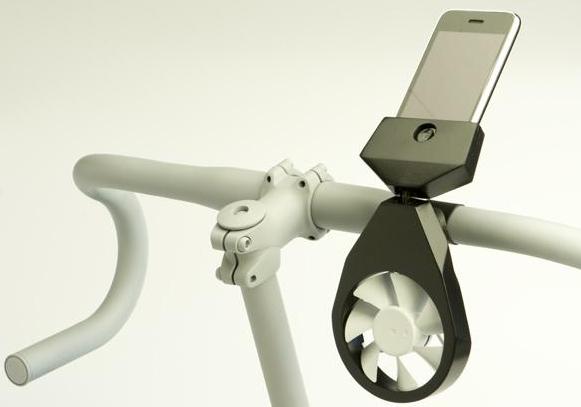
Method 6: Use A Solar-Powered Charger
Another great alternative is a solar-powered charger. It also helps that you can charge outside in the sun and store the energy for later use. Just connect the iPhone to the solar-powered charger and the phone should begin to charge.

Method 7: Use A Hand-Crank Machine
A hand-crank machine gives you the ability to charge your phone using nothing but your muscles. It might even be a great way to get some exercise and it works. Once you’ve purchased a hand crank machine, follow these steps to use it to charge the device.
Step 1: read the manufacturer’s instructions and crank up the machine until you have collected enough power on it.
Step 2: Plug in the iPhone and then continue to crank the device until the iPhone charges. It may take about 2-3 hours to charge.

Method 8: Use A Campfire Charger
There are some chargers that can be attached to your camping pots and pans. They work by absorbing heat from the campfire that they then turn into energy. You can use it by setting the pot on the campfire, plugging in the cable into your iPhone and simply waiting for the iPhone to charge while you cook.

Method 9: Use 4 X AA Batteries
You can also use AA batteries to charge your iPhone or any other device. They are widely available and can be used just abut anywhere. You need to combine 4 of these AA batteries and together they can be used to charge your device. To connect them, you need a battery holder. The power from the 4 connected batteries is the same as you would get from the charging cord.

Method 10: DIY A Fruit Battery
In extreme circumstances, you can make your own battery out of fruit. The process is a little complicated and you’ll still need a charger cable but not the power block or electrical outfit. Before we begin, it is important to note that this type of battery may damage your device. So, only use it if you accept the risk. Here’s what you’ll need to make your own battery out of fruit.
A dozen acidic fruits. They can be citrus, pears or apples.
A penny or a copper screw for each fruit. Pennies after 1982 will have to be sanded to expose the copper.
A zinc nail for every fruit.
Insulated copper wire.
Rubber gloves that you’ll need to prevent getting shocked.
Got everything? Here’s how to make your own battery out of fruit.
Step 1: Insert a zinc nail into a fruit ensuring you leave a bit of the nail exposed to connect the wire to.
Step 2: Next, insert the copper screw into the fruit. You’ll need to place it near the zinc nail but make sure they don’t touch. If you are using citrus fruits, make sure the objects are placed in the same segment of the fruit. Repeat the process with all the fruits, making sure the zinc nail and the copper screw don’t touch.
Step 3: Connect the fruits with the copper wire. You should connect a wire from the copper piece of one fruit to the zinc piece of another and so on until all fruits are connected.
Step 4: Now cut open your USB charging cable to expose the wires inside the cable. Connect the wires to the end of the copper wire connecting the fruits.
Step 5: Now connect the USB cable to your iPhone. Each piece of fruit will produce about half a volt which should produce about 5 volts to charge your device.

Tip: What to Do If Lost Data from iPhone Unexpectedly
Sometimes you can lose some of the data on your device due to unexpected things. If you are not sure whether you’ve lost some of the data on your device, you can use iMyFone D-Back’s free trial to check (iOS 12 supported).
Why Your Lost Data Can Be Recovered?
You are able to recover temporarily lost data for a very simple reason. The iPhone saves data on a database called SQLite. When you delete data, the location the database change from “Allocated” to “Unallocated.” But this doesn’t delete the data. When you add new data to the device, it occupies the “Unallocated” entries first, thereby overwriting the data there. Third-party software can access the iOS SQLite database and recover the deleted data as long as it hasn’t been overwritten.
Steps on How to Recover Unexpectedly Lost Data from iPhone
Sponsor ads:
Gihosoft Free iPhone Data Recovery:https://www.gihosoft.com/iphone-data-recovery-free.html
Gihosoft iPhone Data Recovery Free
Free iPhone Data Recovery Software for Windows/Mac
Recover up to 12+ types of files, including contacts, SMS, photos, WhatsApp, Viber, notes, etc.
Restore lost data from iOS devices directly or from iTunes and iCloud backup
Recover iPhone data lost due to iOS upgrade/jailbreak, accidental deletion, device lost or broken
Support all the latest iPhone, iPad and iPod Touch
Both Free and Pro version.
If you lost data after you updated to a new iPhone, you can always use Gihosoft iPhone Data Recovery to get the data back from the old iPhone or backup.You may also like: iphonerecovery.com
If you use android phones, please choose Gihosoft Android Data Recovery.
With Gihosoft Android Data Recovery, no longer afraid of data loss!
Must read:Youtube video downloader for pc
Gihosoft RePicvid Free Photo Recovery Software provides a free photo recovery software for windows to help users recover the deleted or lost photo for free.
Jihosoft Android Data Recovery: the best Android Data Recovery software for Windows and Mac to recover deleted contacts, messages, photos, videos, WhatsApp and etc from Android devices.Tips:How to transfer messages from iPhone to iPhone
jihosoft Free iPhone Data Recovery


No comments:
Post a Comment